Ship HubSpot at the speed of AI
Safely and consistently use Claude to make new pages and site-wide updates just by asking. We train Claude on your brand and module system so it doesn’t improvise or drift as it builds.
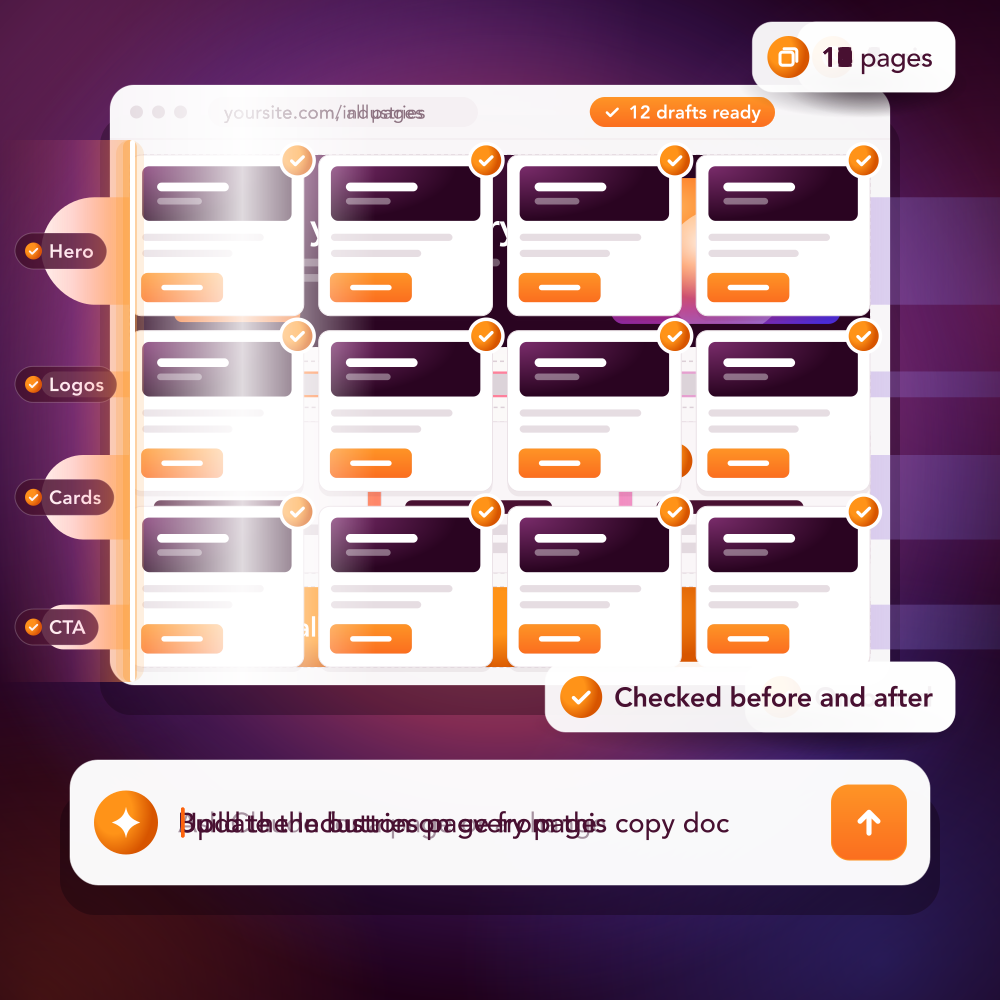
Every page on brand, without the wait
Your design system lives in modules nobody has written down. New pages wait on a developer, drift from the last one, and generic AI output gets rebuilt by hand. We fix all three.
Hand us a copy doc and get back a finished page. Your developers stop being the bottleneck.
Your house style is written down as rules Claude follows, so every page matches the last.
It builds only from your own modules and rules, never from ad hoc prompts.
Before-and-after snapshots of every live page show exactly what changed.
New options and presets keep today’s look as the default, so live pages stay exactly as they are.
Your design rules, module catalogue and copy docs are written down in plain files you own.
From a copy doc to a page you can edit
1 Drop your copy doc into Claude
2 Claude builds it in your HubSpot
3 Drag a section
4 Edit the text
5 Ask Claude for one change
A new page, when you bring the copy and images
A new page, with the copy and images made for you
One module updated everywhere it is used
Why it’s better than an AI page builder
| AI page builders | FeaturedClaude trained in your HubSpot | |
|---|---|---|
| What it is made of | A one-off generated layout | Your own modules and presets |
| Changing it later | Prompt again and hope | Drag, drop and edit in HubSpot, or ask Claude for one precise change |
| Staying on brand | Drifts with every generation | Locked to your design system by the modules themselves |
| Where the page lives | A separate tool, or exported code | Your HubSpot, as a normal page |
| Before it goes live | You check everything | Checked by our AI agents and a person, and it stays a draft until you approve it |
Swipe for more →
AI page builders
What it is made of
A one-off generated layout
Changing it later
Prompt again and hope
Staying on brand
Drifts with every generation
Where the page lives
A separate tool, or exported code
Before it goes live
You check everything
Claude trained in your HubSpot
What it is made of
Your own modules and presets
Changing it later
Drag, drop and edit in HubSpot, or ask Claude for one precise change
Staying on brand
Locked to your design system by the modules themselves
Where the page lives
Your HubSpot, as a normal page
Before it goes live
Checked by our AI agents and a person, and it stays a draft until you approve it
What we did on rdadigital.com
We catalogued our own HubSpot theme and wrote 74 design rules from our live site. To prove it works, we rebuilt 56 of our live pages from copy docs, with every line of copy in place.
Then we wrote, sourced and built 12 industry pages and an event page, each with its own AI photos, and upgraded five live modules with every page checked before and after.
Reading the site meant crawling 59 live pages and cataloguing all 28 modules in the theme.
Live pages rebuilt from copy docs, with all of the copy in place
To build 12 industry pages, with their copy and photos
New pages written, sourced and built, counting the event page
Start with an audit, then align, train and roll out
| Phase 1 | Phase 2 | Phase 3 | Phase 4 |
|---|---|---|---|
| Audit | Module alignment | Training | Rollout |
We connect to your HubSpot, read your design system out of your theme and live site, and write it down. | We align your modules with best practices, and polish the design as needed. | We train Claude on your real pages, then prove it on new ones. | Improved modules go live in small batches at first, checked by our AI agents and a person, before and after. |
|
|
|
|
Swipe for more →
Phase 1
Audit
We connect to your HubSpot, read your design system out of your theme and live site, and write it down.
- A catalogue of every module and option
- Your house style, written as design rules
- A reference page for every module
- Recommendations and a confirmed scope
Phase 2
Module alignment
We align your modules with best practices, and polish the design as needed.
- A new module library: fewer, more flexible modules
- Presets for common layouts
- A module map of what is updated, replaced or combined
- Design polish, as needed
Phase 3
Training
We train Claude on your real pages, then prove it on new ones.
- A copy doc for every live page
- Claude, trained on your modules and rules
- Every rebuild checked against its live page
- Tested in a sandbox and on brand-new pages
Phase 4
Rollout
Improved modules go live in small batches at first, checked by our AI agents and a person, before and after.
- Improved modules live on your site
- Before-and-after snapshots of every live page
- Drafts only on your live site
- Every page checked before it goes live
Your project, step by step
A tested process for bringing AI into your HubSpot without losing your brand.
Audit
Where your brand and modules stand today.
If you’re moving into HubSpot: we copy your site into our own HubSpot test instance. Your live site isn’t touched.
We connect to your HubSpot and copy your theme into a private workspace that everything else is built from. Access keys never sit in a document or a chat.
We catalogue every module and option, read your live site page by page, and write your house style down as rules, with a reference page for every module.
- A catalogue of every module and option
- Your house style, written as design rules
- A reference page for every module
- Recommendations and a confirmed scope
Module alignment
Your modules, aligned and improved.
If you’re moving into HubSpot: we build your module library in HubSpot from your site’s patterns.
We align your modules with best practices: fewer, more flexible modules, presets instead of one-offs. Every change keeps today’s look as the default, and nothing is renamed or removed.
We apply any design polish or style updates your modules need.
- A new module library: fewer, more flexible modules
- Presets for common layouts
- A module map of what is updated, replaced or combined
- Design polish, as needed
Module alignment and best practices
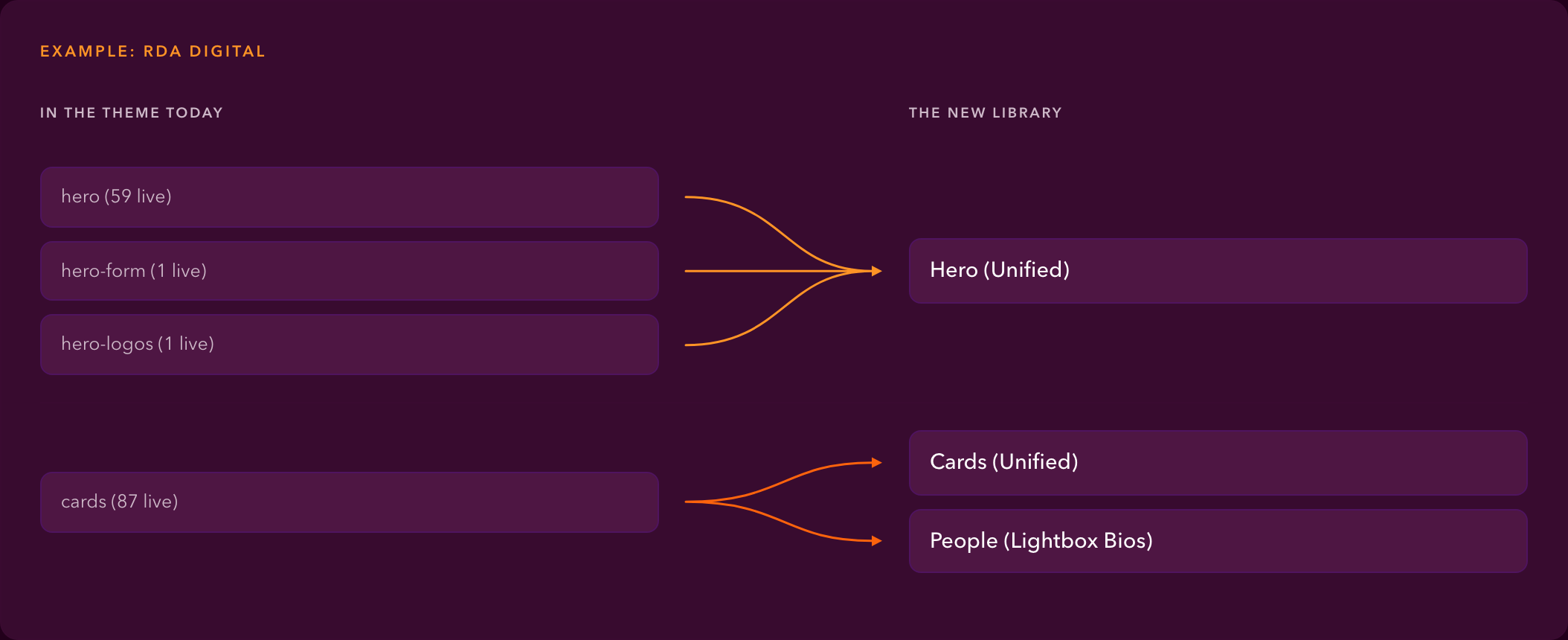
Remapping your modules
An example from our own theme: three separate hero modules become one Hero (Unified), and one cards module becomes Cards (Unified) and People (Lightbox Bios).
Fewer, more flexible modules
One hero, many layouts. Show an image, a form or a row of logos by flipping a setting, with nothing copied into a new module.
Presets for common layouts
Pick a ready-made preset in one click: cards, cards with icons, rows, or rows with icons. Pages stay consistent, and new ones come together in minutes.
Training
A training loop runs until every rebuilt page matches its live original, then we test it on brand-new pages.
Each live page becomes a plain-English copy doc, and Claude rebuilds it from your modules.
Once Claude is trained, we test everything in a sandbox, yours or ours, and confirm it works.
Then we connect to your live HubSpot and confirm it works on a few draft pages.
- A copy doc for every live page
- Claude, trained on your modules and rules
- Every rebuild checked against its live page
- Tested in a sandbox and on brand-new pages
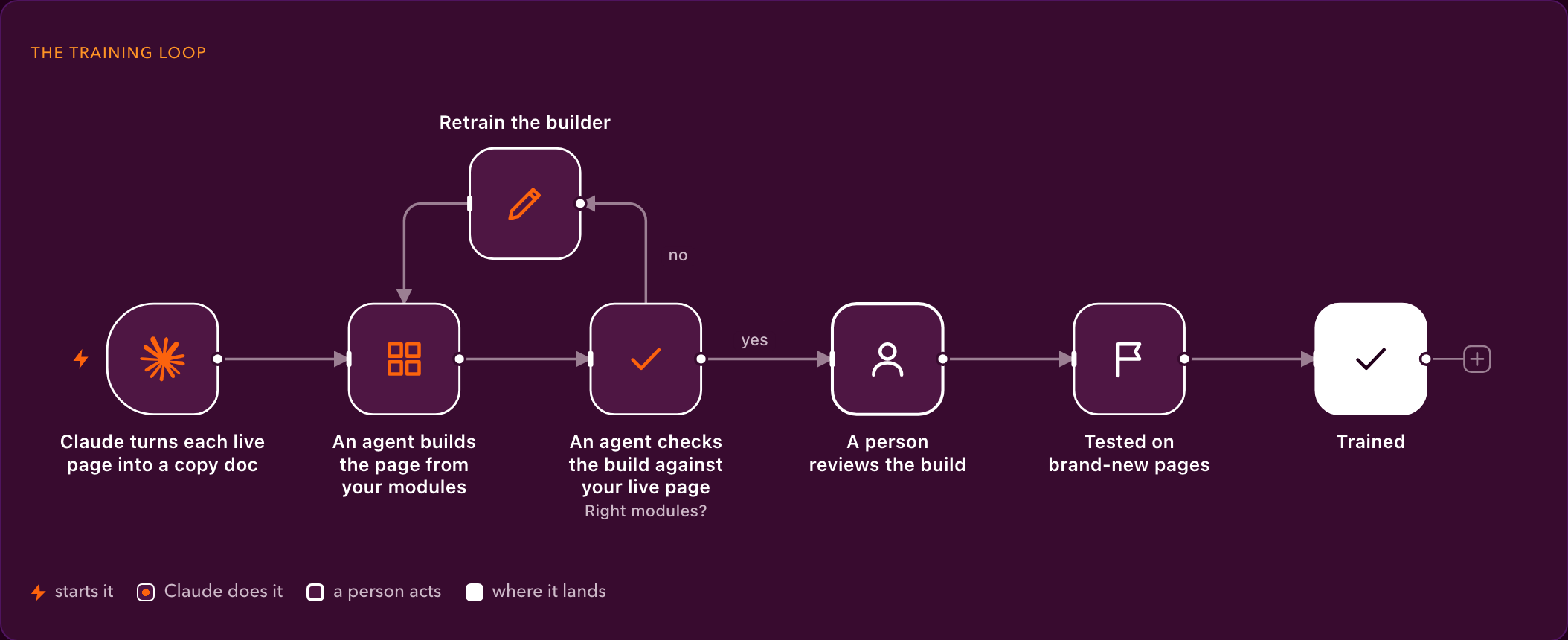
The training loop
Claude turns each live page into a copy doc, an agent builds the page from your modules, and a second agent checks the build against your live page. Anything off retrains the builder.
The final test
A person reviews it, and brand-new pages are the final test.
Rollout
Planned, then live in small batches.
If you’re moving into HubSpot: every page is rebuilt section by section, checked and approved.
Using the module map, we plan which pages to update with the new modules, or all of them.
We start with small batches, least-used modules first, with before-and-after snapshots of every page, then widen the rollout.
- Improved modules live on your site
- Before-and-after snapshots of every live page
- Drafts only on your live site
- Every page checked before it goes live
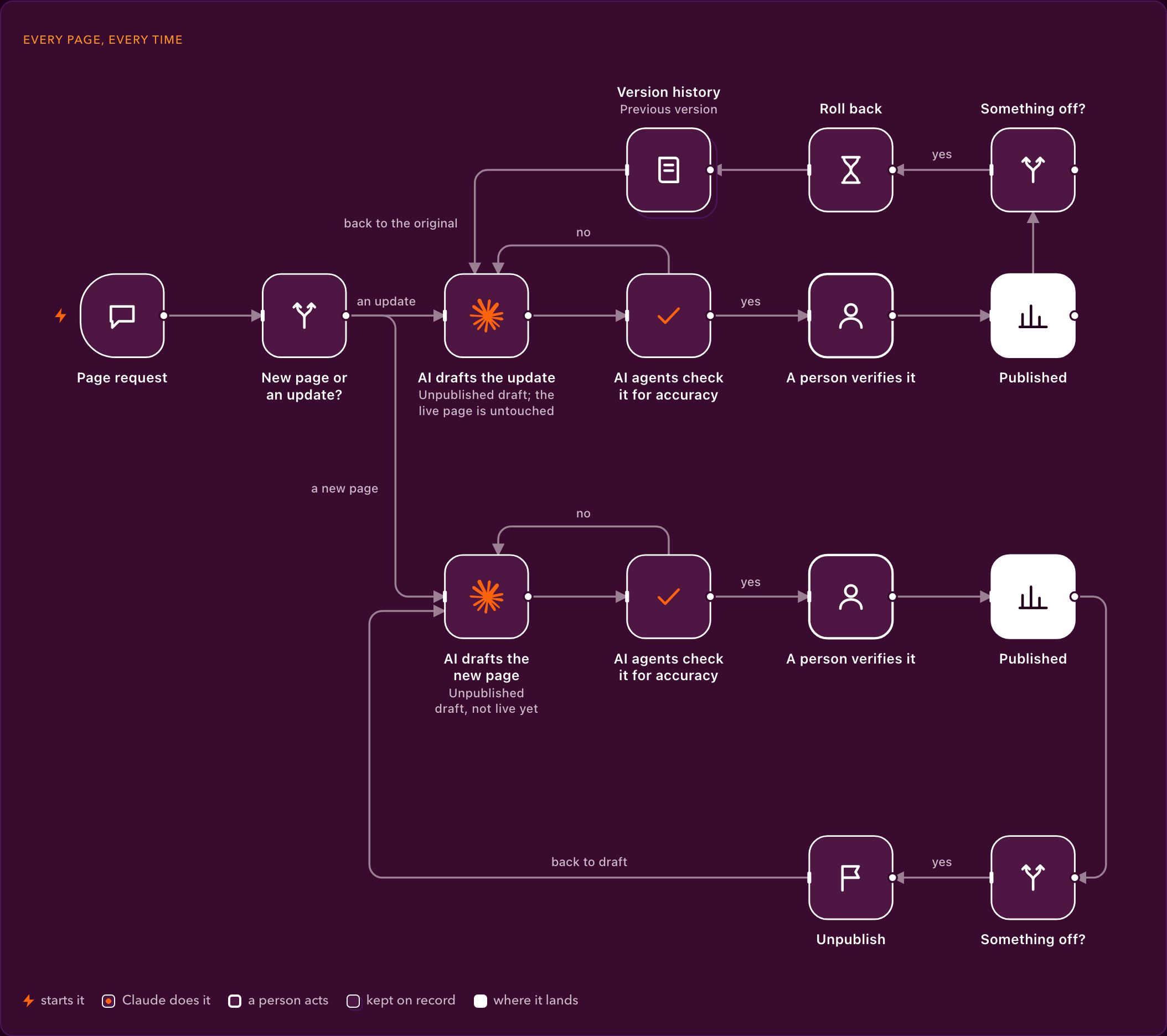
QA on every page, every time
Nothing publishes straight from Claude.
Before it goes live
An update and a brand-new page run the same way: our AI agents check the unpublished draft, then a person verifies it.
If anything is off
An update rolls back to the version before it. A new page comes down.
Nothing goes live by accident
Every change is reversible, and a person has the last word.
Every change can be rolled back.
On your live site, Claude only creates drafts. A person publishes.
Every live page is captured before and after each change, and any difference is flagged for review.
Post-launch
Three ways to run it once your pages are live.
Recommended
We manage every change to your live site. Anything can be rolled back, and we help you decide on design and functionality as your content grows. We can set up a sandbox for your team to build new pages, and a workflow to move them live.
A few people on your team run Claude in your HubSpot, or in a separate sandbox for extra protection. Your team can try ideas and build quickly, without the risk of site-wide changes nobody intended.
We give you the guidelines, and your team runs it with no involvement from us. The risk: modules drift, edits reach further than intended, and changes go unnoticed or are hard to roll back.

Let’s connect Claude to your HubSpot
Bring your HubSpot theme and the pages you need built.